A Falling-Sand Hourglass You Can Turn and Tilt
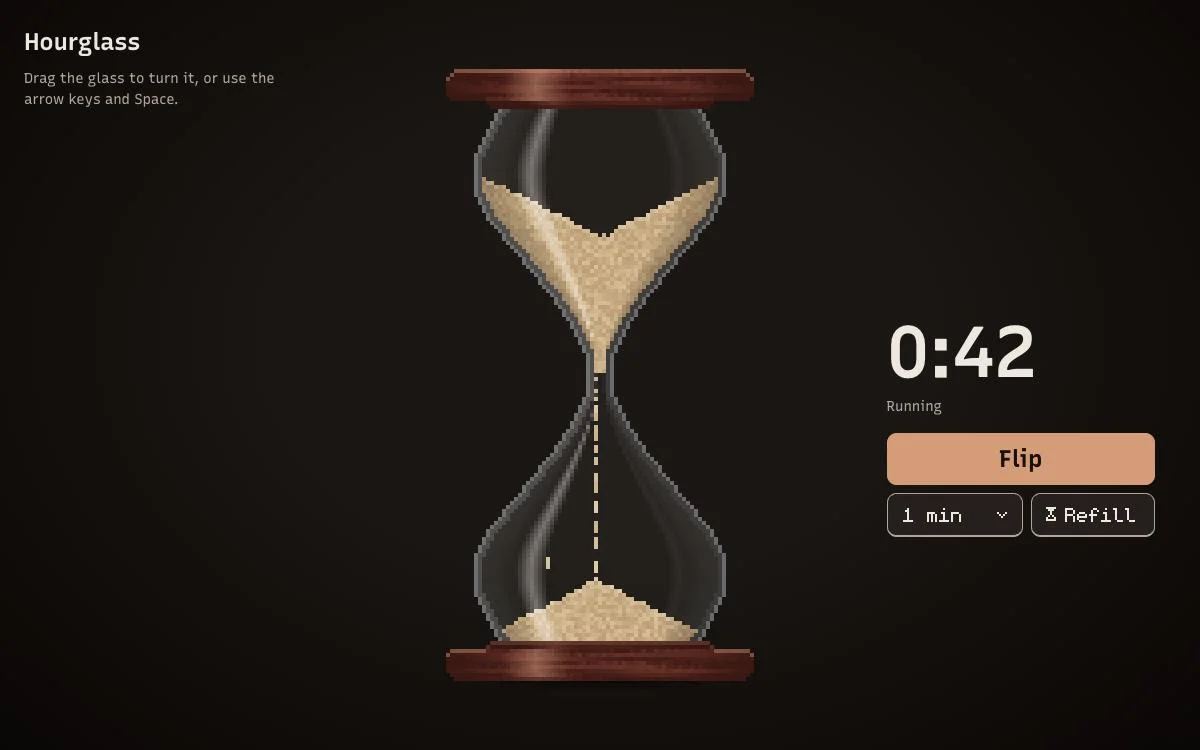
Background
A falling-sand simulation is a fun way to explore simple physics and graphics programming at the same time. There is even a whole genre built around it: falling-sand games are sandbox games that simulate materials as particles on a two-dimensional grid and let them interact. The Powder Toy is a great example, with dozens of materials and reactions to play with. Noita takes the same idea into a roguelike, where every pixel is simulated and the many interacting materials will regularly cause your sudden and chaotic death.
I wanted something smaller: a falling-sand toy that looks and behaves like a real hourglass, timer included. When I think of falling sand in real life, that is the first thing that comes to mind.
Falling sand with real gravity
If you want an introduction to falling-sand simulations and a hands-on tutorial for building one, The Coding Train's Falling Sand challenge is a great place to start. The classic version moves every grain one cell down per step and has gravity point straight down. Mine goes a bit further.
Every grain has its own velocity. It speeds up while falling, keeps its momentum when the glass turns and stops when it hits something. Gravity can point in any direction, so you can drag the glass to any angle and the sand reacts while it turns. The grains furthest along the direction of gravity are updated first, so a whole column of sand falls together instead of one grain per step.
When a grain is blocked, it tries the two cells 45° to either side of where it wanted to go, which on a grid means one cell down and one cell to the side. It only takes a slide that still leads downhill:
In code, slightly simplified, the rule looks like this. gravity is the normalised gravity vector, and the dot product says how much a move points along it:
// The grain wanted to move in direction `dir`, but that cell is full.
for (const side of [rotate45(dir, -1), rotate45(dir, +1)]) {
    const downhill = dot(normalize(side), gravity);
    if (downhill < SLIDE_MIN_DOT) continue; // would lead uphill (or sideways)

    if (isEmpty(x + side.x, y + side.y)) {
        return move(grain, side); // slide off the obstacle
    }
}
return rest(grain); // nowhere to go: the grain stops and loses its speed
The real version tries the more downhill side first and keeps half of the grain's speed after a slide, but the idea is the same. Because the check uses the actual gravity vector, piles settle sideways when the glass is tilted, just like real sand.
Plain cellular sand like this piles up at exactly 45°. Every now and then, a resting grain is therefore allowed a sideways "knight's move": one cell to the side, then one diagonally down. That lowers the angle of repose to roughly 30–35°, which is close to real sand. The crater on top and the heap below look much more natural that way and, more importantly, much more interesting :D
The shape matters
Once the sand worked, I moved on to the shape of the hourglass and the timer. My first attempt was modelled on the ⏳ emoji, and the top bulb never emptied: grains stayed glued to the funnel walls. The reason is the 45° rule from above. In this kind of simulation, a wall at 45° or flatter can hold a stable layer of grains forever.
The fix was to build the outline outwards from the neck and never let it widen by a full cell per row. That is also why real hourglasses are so steep near the neck. A nice side effect: the glass now looks prettier and more realistic, and the sand piles up in more interesting ways when you turn it.
The project has a simple test for this, too. It lets the sand run for a while and fails if anything is left in the top bulb. Don't you love a simple test like that?
A timer that's actually accurate
Left alone, the glass empties in about ten seconds, which was a bit too fast for me. The neck now lets grains through at a fixed rate, the number of grains divided by the chosen duration. It banks up to two seconds of flow, so short stalls are caught up, for example when the neck is briefly empty or the glass is on its side. The result is a timer from 30 seconds to 10 minutes that is accurate to well under a second. I might still add a 3-minute option for brushing your teeth, or allow any duration.
Tilt your phone
Yes, yes, turning the hourglass on the website is easy. But I wanted it to be more fun, so on a phone you can also tilt the device and the sand follows. The Use tilt button reads the phone's orientation sensor and turns it into a gravity vector in the plane of the screen. Hold the phone upright and the sand gets full gravity; lay it flat on the table and the sand rests. Tilting works together with dragging the glass and also handles landscape mode. On iOS the browser asks for permission first, and the sensor only works over HTTPS.
Look and feel
The hourglass is drawn at one pixel per grain and then scaled up, so it stays crisp pixel art with no anti-aliasing, just like the ⏳ emoji and the favicon. The light comes from the upper left, the highlights stay on the left after you flip the glass, and the contact shadow fades as the glass turns. It follows your system's light or dark mode (a toggle will come later), and the controls use a pixel font. You can also install it and use it offline. I'll try to package it as an Android app at some point, because why not.